
Start from a specific event
Choose the event that runs a rule and add the conditions that make the action relevant to the conversation.
Build rules around events, conditions and actions. Use intelligent workflows when a request needs structured information before it reaches the right person.
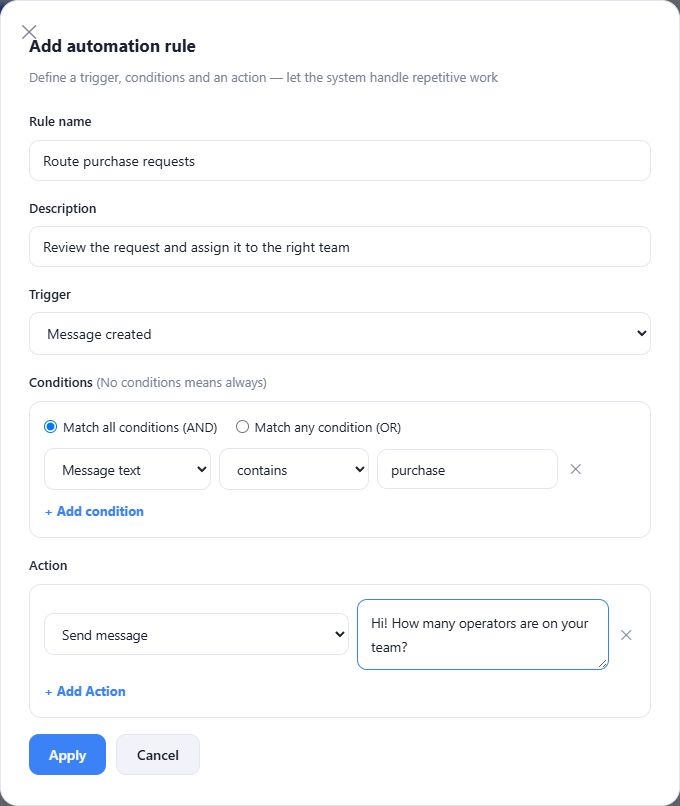
Choose the event that runs a rule and add the conditions that make the action relevant to the conversation.
Available actions include assignment, labels, priority changes, replies and conversation resolution, depending on the selected rule.
An intelligent workflow can recognize a defined topic, ask for specified fields, record an internal note and hand off the conversation.
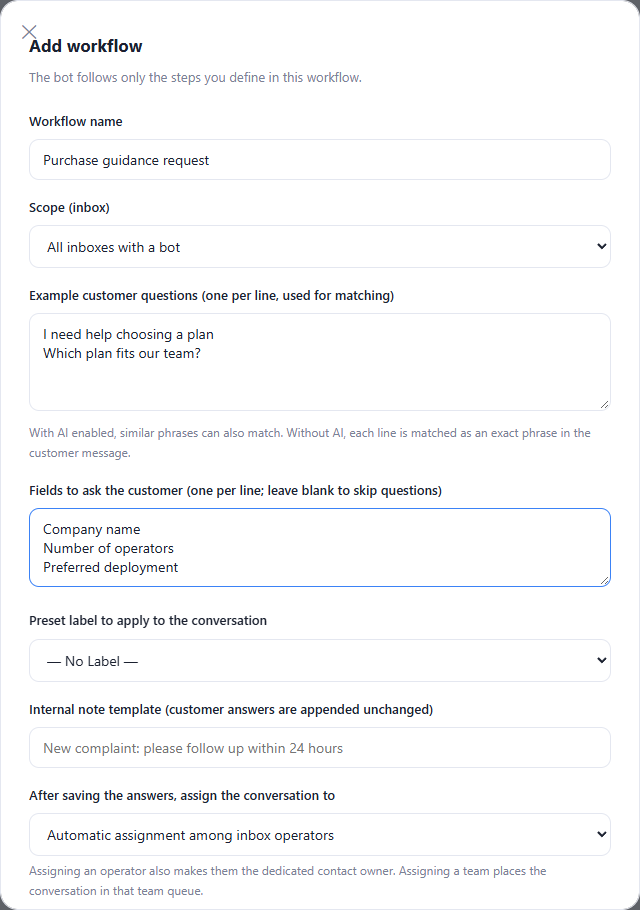
Name the rule and choose the event that should trigger it.
Add the conditions and the actions your team has agreed on.
Review the rule on sample cases before enabling it.
Yes. The rule editor offers matching all conditions or matching any condition, so the team can choose the appropriate scope.
Enlarge the product screenshots on this page or explore the interactive workspace demo. The demo uses local sample data; plan availability is listed on the pricing page.
Explore the workspace demoCompare the available plans and decide which capacities your support team needs.